







Find your FLOW: The analog method for deep focus.
What is FLOW?

A chaotic desk. Constantly distracted while working. Many know the feeling – we do too. That's why we developed FLOW: a simple, analog system using the Infinity Stonepaper Board. It allows us to work with focus, visualize our thoughts, and master projects with clarity and creativity. All without a screen. All without distractions.
In this post we'll show you how you can use FLOW yourself – and why this board is our absolute favorite "app", even though it's completely analog.
Analog flow with digital assistance
Digital tools often cause more stress than they solve. Instead of helping, they steal focus and time. With FLOW, we finally create a clear, tangible workspace again – beyond apps, tabs, and notifications. And yet, we find smart ways to use digital applications efficiently.
This will bring you FLOW:

Ideal for you if...
- ...you get distracted easily at the computer.
- ...you work creatively, plan strategically, or build concepts.
- ...you like to think analogously and feel the pen in your hand.
- ... you want a system that doesn't overwhelm, but supports.
- ... you want to escape your digital fatigue (screen fatigue).
- ... you need to understand your projects tangibly and see them physically in front of you.
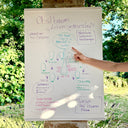
Here's how to set up your FLOW system
1. Missions
Your missions – what you've set out to do – are listed on the left side of the board. Unlike traditional to-do lists, this is about conscious, clearly defined goals. When something is completed, you simply swipe it away. Done.
2. FLOW-Space
The large central area is your personal workspace. Here you create everything you need for your current mission: texts, sketches, overviews, or creative mind maps. Everyone designs this space differently – that's precisely what makes FLOW so versatile.
While you work, you can rearrange, add to, cross out, or wipe away information at any time. The process remains dynamic – and that's crucial for true concentration.

3. Storage
While working, thoughts often arise that have nothing to do with the current task. Instead of suppressing them or letting yourself be distracted, write them down. Later, you can sort them and transfer them digitally if needed, for example to Google Tasks.
4. Idea Box
The right side of the board is for spontaneous ideas, flashes of inspiration, and impulses. These ideas are later transferred to a separate document—for example, a digital idea journal. This way, nothing gets lost, and you still stay in the flow.
5. Time window
It often helps to set a clear time frame. 15 or 25 minutes of focused work – without breaks or interruptions. An analog timer or an hourglass can help you stay on schedule.

6. Save and process further
Once your mission is complete, simply take a photo. With tools like ChatGPT or text recognition apps, you can digitize the content and use it immediately. This saves you typing – and gives you time for the next step.
7. Reset
A damp cloth is all it takes – and your FLOW space is ready for the next mission. No paper waste, no chaos, no clutter.
Ready for real concentration?
Want to try it out? Then get your own Infinity Stonepaper Board. Set up your FLOW setup and find your own rhythm.
To the Infinity Stonepaper Board


